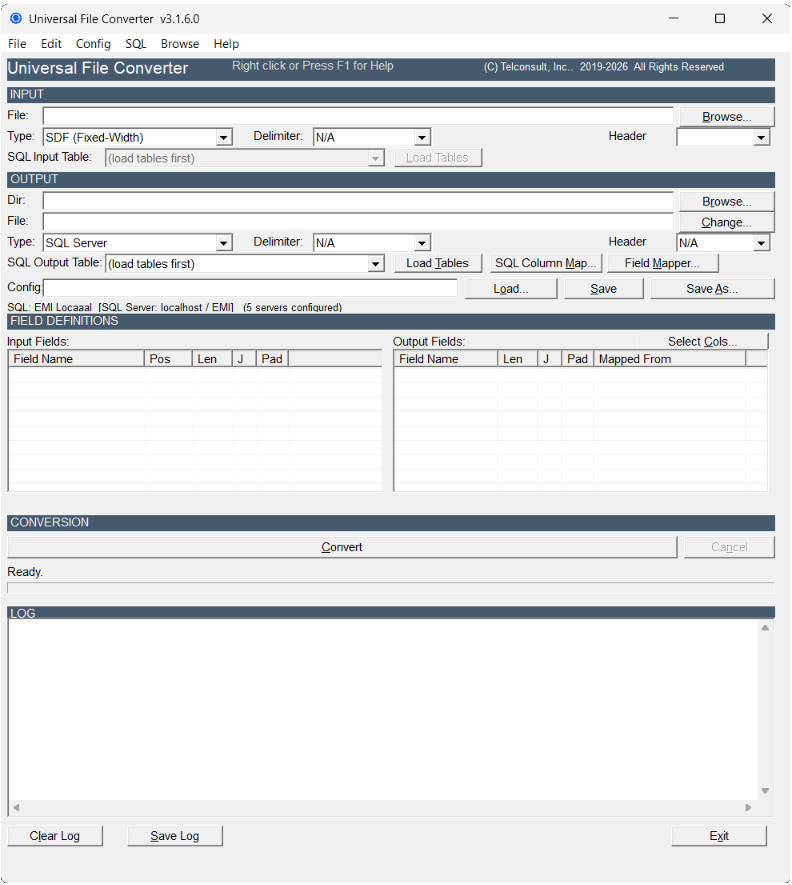
Professional Data Migration Tool

Convert Any Data File
to Any Format

DBF, SDF, CSV, Access, SQL Server, MySQL, XML, and XLSX — all in one Windows application with field-level mapping and direct SQL integration.

View Plans & Pricing View Support Docs
Windows 10 / 11 8 File Formats Subscription Plans Available Telconsult, Inc.

Supported Formats

DBF SDF / Fixed-Width Delimited / CSV Microsoft Access SQL Server MySQL XML Excel XLSX

Everything a Data Professional Needs

Built for telecom carriers, DBAs, and IT teams who move data between systems every day.

🗂️

Field-Level Mapping

Map any input field to any output field. Auto-map by name, or drag and drop manually. Handles truncation, padding, and 10-character DBF name limits automatically.

🧮

CALC Expressions

Build derived fields with inline expressions: arithmetic, string concatenation, conditionals with IIf(), and zero-padding for numeric results.

⏭️

Skip Rules

Filter records before conversion. Match on equals, not-equals, LIKE patterns, numeric comparisons, or EMPTY fields. Combine rules with AND / OR logic.

🗄️

Direct SQL Integration

Connect directly to SQL Server or MySQL. Browse tables, manage schema, and write records without exporting to an intermediate file first.

📡

Multi-Output Routing

Split a single input file into MAIN, HDR, and TRL output streams based on CAT/GRP/TYP field values — designed for telecom EMI record processing.

📋

Config Manager

Save, organize, and reuse conversion configurations as .cfg files. Create new configs, import from emigui, and edit field layouts in the built-in configuration editor.

Format Support at a Glance

Convert between any combination of these eight formats in a single pass.

FormatExtensionAs InputAs OutputRequirements
DBF (dBase / FoxPro).dbf ✓ Yes ✓ Yes None
SDF (Fixed-Width).txt / any ✓ Yes ✓ Yes Field layout in .cfg file
Delimited (CSV).csv / .txt ✓ Yes ✓ Yes None
Microsoft Access.mdb / .accdb ✓ Yes ✓ Yes Access Database Engine
SQL Servern/a ✓ Yes ✓ Yes ODBC Driver 17+
MySQLn/a ✓ Yes ✓ Yes MySQL ODBC Driver
XML.xml ✓ Yes ✓ Yes None
Excel XLSX.xlsx — No ✓ Yes None

Simple Four-Step Workflow

From raw data file to converted output in minutes.

1

Load a Config

Open or create a .cfg file that defines your input field layout and output structure.

2

Select Input

Browse for your input file or connect to a SQL Server / MySQL table.

3

Map Fields

Use the Field Mapper to link input fields to output columns. Auto-Map handles matching names instantly.

4

Convert

Click Convert. The status bar shows Written / Skipped / Total counts in real time.

Simple, Transparent Plans

Both plans include the full 8-format conversion engine. Upgrade or cancel any time.

Standard

Single-seat license for one machine. Core conversion engine with email support.

$19.99 / month
$59.99 / quarter  •  $229.99 / year
  • ✓ All 8 format conversions
  • ✓ Single machine license
  • ✓ SQL Server & MySQL integration
  • ✓ Field Mapper & Config Manager
  • ✓ Email support
  • ✗ Telephone support
  • ✗ Multi-machine license
  • ✗ Lifetime free updates
🛒  Buy on Gumroad 💳  PayPal — Coming Soon ⊞  Microsoft Store — Coming Soon
Most Popular
Professional

Extended license for multiple machines with priority support and lifetime updates.

$39.99 / month
$111.99 / quarter  •  $449.99 / year
  • ✓ All 8 format conversions
  • Multi-machine license
  • ✓ SQL Server & MySQL integration
  • ✓ Field Mapper & Config Manager
  • ✓ Email support
  • Priority telephone support
  • Free updates for life of product
🛒  Buy on Gumroad 💳  PayPal — Coming Soon ⊞  Microsoft Store — Coming Soon
🔑
License Key Delivery
Your license key will be emailed to you within 1 business day of purchase. Check your spam folder if you don’t see it. Questions? Email support@nextgencarrier.net.

Ready to Get Started?

Buy directly on Gumroad or wait for PayPal and Microsoft Store options. Windows 10 and Windows 11, 64-bit.

🛒  Buy on Gumroad   💳  PayPal — Coming Soon   ⊞  Microsoft Store — Coming Soon

Questions? Email support@nextgencarrier.net