v3.1.5 — Now Available on the Microsoft Store

Convert Any Data File
to Any Format

DBF, SDF, CSV, Access, SQL Server, MySQL, XML, and XLSX
all in one Windows application with field-level mapping and direct SQL integration.

Invaluable to any software developer, data analyst, service bureau, or end user working with multiple file protocols.

View Plan & Pricing Get it from Microsoft
Windows 10 / 11 8 File Formats No Cloud No Code
DBF SDF / Fixed-Width Delimited / CSV Microsoft Access SQL Server / Azure SQL MySQL XML Excel XLSX

Features

Everything a Data Professional Needs

Built for telecom carriers, DBAs, and IT teams who move data between systems every day.

🗂️

Field-Level Mapping

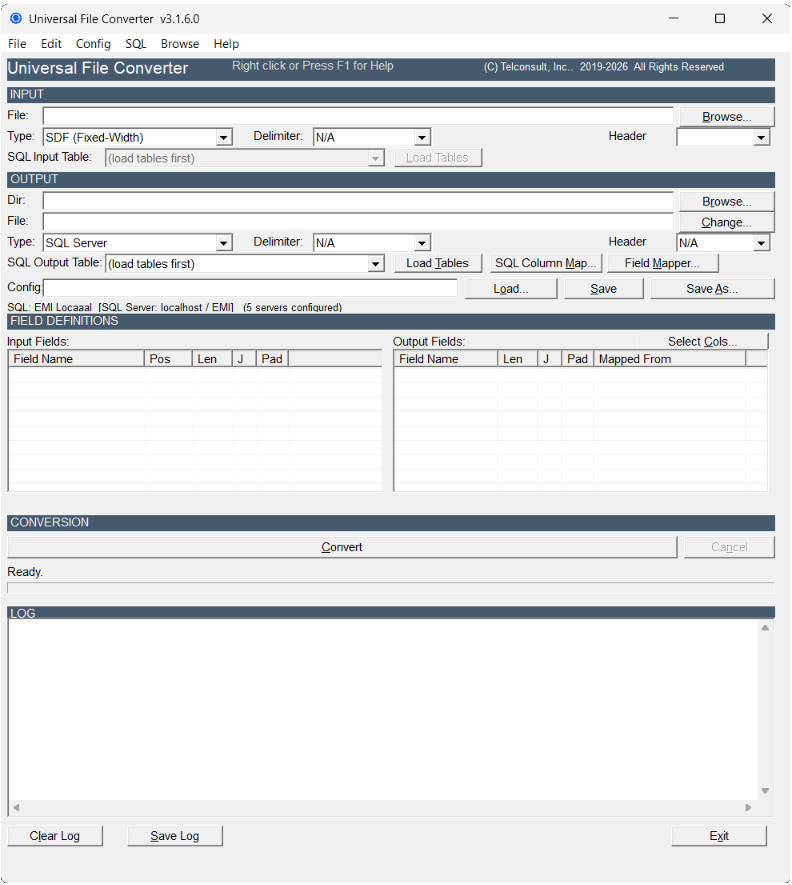
Map any input field to any output field. Auto-map by name, or assign manually. Handles truncation, padding, and 10-character DBF name limits automatically.

🧮

CALC Expressions

Build derived fields with inline expressions: arithmetic, string concatenation, conditionals with IIf(), and zero-padding for numeric results.

⏭️

Skip Rules

Filter records before conversion. Match on equals, not-equals, LIKE patterns, numeric comparisons, or EMPTY fields. Combine rules with AND / OR logic.

🗄️

SQL Table Manager

Create, drop, rename, and truncate SQL tables visually. Manage indexes, set column constraints, and execute free-form T-SQL — no SSMS required.

📡

Multi-Output Routing

Split a single input file into MAIN, HDR, and TRL output streams based on CAT/GRP/TYP field values — designed for telecom EMI record processing.

📋

Config Manager

Save, organize, and reuse conversion configurations as .cfg files. Create new configs, import from emigui, and edit field layouts in the built-in editor.

Compatibility

Format Support at a Glance

Convert between any combination of these eight formats in a single pass.

FormatExtensionAs InputAs OutputRequirements
DBF (dBase / FoxPro).dbf✓ Yes✓ YesNone
SDF (Fixed-Width).txt / any✓ Yes✓ YesField layout in .cfg file
Delimited (CSV).csv / .txt✓ Yes✓ YesNone
Microsoft Access.mdb / .accdb✓ Yes✓ YesAccess Database Engine
SQL Server / Azure SQLn/a✓ Yes✓ YesODBC Driver 17+
MySQLn/a✓ Yes✓ YesMySQL ODBC Driver
XML.xml✓ Yes✓ YesNone
Excel XLSX.xlsx✓ Yes✓ YesNone

How It Works

Simple Four-Step Workflow

From raw data file to converted output in minutes.

1

Load a Config

Open or create a .cfg file that defines your input field layout and output structure.

2

Select Input

Browse for your input file or connect to a SQL Server / MySQL table.

3

Map Fields

Use the Field Mapper to link input fields to output columns. Auto-Map handles matching names instantly.

4

Convert

Click Convert. The status bar shows Written / Skipped / Total counts in real time.

What's New

v3.1.5 Release Notes

Latest improvements and fixes in the current release.

Universal File Converter v3.1.5.0

  • New Run SQL executor — execute free-form T-SQL directly from SQL Table Manager
  • New Unique column constraint option in SQL Table Manager
  • New Excel XLSX accepted as both input and output format
  • Fix DBF / Access → SQL Server / MySQL export: schema repair now called for DBF-sourced exports, resolving 0 rows written
  • Fix Silent DDL failures caused by missing -b flag on sqlcmd corrected
  • Fix TRUNCATETBL error logging and reporting improved
  • Improved SQL Table Manager UI — expanded field labels, resized control spacing, and layout polish
  • Improved Log window now shows Written / Skipped / Total counts in real time

FAQ

Common Questions

Quick answers to the questions we hear most often.

No. You need the free Microsoft Access Database Engine 2016 Redistributable, available from Microsoft.com. The full Microsoft Office or Access suite is not required.

Yes. SQL Server mode connects to Azure SQL, on-premises SQL Server (2012 and later), and SQL Server Express using ODBC Driver 17 or later.

Yes. A 7-day free trial is available through the Microsoft Store. The full conversion engine — all 8 formats — is active during the trial period. No credit card is required to start.

Yes. SQL Server connections support both Windows Authentication and SQL Server (username / password) credentials. MySQL connections require SQL credentials.

Universal File Converter runs on Windows 10 and Windows 11 (64-bit). It is a native Windows desktop application — no browser or cloud service required.

Yes. Every configuration — field layouts, mapping, skip rules, and output settings — is saved as a .cfg file. The Config Manager lets you load, create, edit, and organize configs in one place.

The engine is optimized for high-volume batch work. Conversions of 100,000+ records per pass are typical in production environments. Performance depends on disk I/O, SQL server throughput, and available RAM.

Multi-Output Routing splits a single input file into multiple output streams (MAIN, HDR, TRL) based on the value of a CAT, GRP, or TYP field. Originally designed for telecom EMI record processing, it applies to any data set with content-based routing needs.

About

Built by Telecom Veterans

40+
Years in Telecommunications
8
Supported File Formats
100K+
Records Per Conversion Pass
3
SQL Engines Supported

Nextgencarrier is a telecom software company with over four decades of experience in carrier access billing, CLEC operations, long-distance carrier services, and international interconnect. Universal File Converter is built on real production data requirements — not theoretical edge cases.

Pricing

Simple, Transparent Plan

Full 8-format conversion engine. Available on the Microsoft Store.

Single-seat license for one machine. Full 8-format conversion engine.

$249.99
One Time Purchase
  • All 8 format conversions
  • Single machine license
  • SQL Server, Azure SQL & MySQL integration
  • Field Mapper & Config Manager
  • Execute free-form T-SQL
  • Multi-Output Routing Based on Content
💡
Now on the Microsoft Store
Universal File Converter v3.1.5 is available on the Microsoft Store. Questions? Email support@nextgencarrier.net.

Ready to Get Started?

Available now on the Microsoft Store. Windows 10 and Windows 11.

Get it from Microsoft

Questions? Email support@nextgencarrier.net
